Evaluating RAG Agents with RAGAS: From Datasets to Automated Experiments
Retrieval‑Augmented Generation (RAG) systems promise grounded, trustworthy answers—but only if we can measure how well they actually perform. Over the past few weeks, I deep‑dived into RAGAS, an evaluation framework purpose‑built for RAG pipelines.
In this post, I’ll walk through my hands‑on journey with RAGAS:
Creating and saving evaluation datasets from scratch
Understanding and applying core metrics like Faithfulness, Answer Relevancy, and Context Precision
Running experiments programmatically over datasets
Generating synthetic test sets using TestsetGenerator
Stitching everything together into repeatable evaluation loops
If you’re building RAG agents and exploring RAGAS for setting up an evaulation framework, this post is for you.
Why RAG Evaluation Is Different from classic AI use case
Unlike traditional NLP tasks, RAG systems have multiple moving parts:
Retrieval quality (Did we fetch the right context?)
Generation quality (Did the model answer correctly?)
Grounding (Did the answer rely on retrieved context or hallucinate?)
Classic metrics like BLEU or ROUGE don’t capture this well. What we need instead are LLM‑as‑judge metrics that understand:
Whether an answer is supported by the context
Whether it actually addresses the question
Whether the retrieved documents were ranked in the order of relevance.
This is exactly where RAGAS fits in.
What is RAGAS and How It Supports Evaluation
By using RAGAS (Retrieval-Augmented Generation Agent Suite) toolkit, developers can benchmark their agents against common datasets, compare performance across different retrieval and generation strategies, and identify areas for improvement.
RAGAS is an evaluation framework designed specifically for RAG pipelines. It standardizes:
Dataset formats for RAG evaluation
A set of well-defined metrics
Experiment orchestration over datasets
At a high level, RAGAS expects data in the form:
Question
Generated Answer
Retrieved Contexts
(Optionally) Ground‑truth answers
Once you have this, RAGAS can score your system across multiple dimensions.
Step 1: Creating Evaluation Datasets from Scratch
My first step was learning how to build RAGAS datasets manually.
Each dataset row represents a single RAG interaction:
A user query
Context chunks retrieved by the retriever
The final answer generated by the LLM
Once structured, these rows are converted into a RAGAS Dataset object. The key benefit here is repeatability—you can:
Save datasets to disk
Reuse them across experiments
Compare multiple RAG versions on the same inputs
This immediately changed how I think about RAG debugging: evaluation became data‑driven rather than anecdotal.

Step 2: Understanding Core RAGAS Metrics
Before running experiments, I spent time understanding what each metric actually measures.
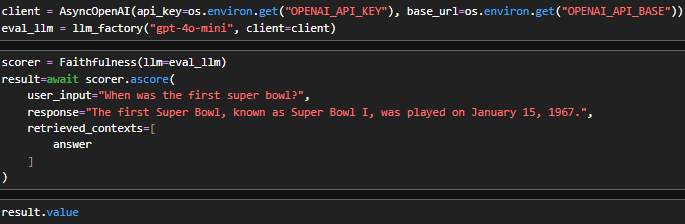
1. Faithfulness
Question: Is the answer supported by the retrieved context?
Faithfulness checks whether the generated answer can be traced back to the provided context chunks. If the model invents facts—even if they sound correct—this score drops.
This metric is critical for:
Enterprise RAG systems
Compliance and regulated domains
Any application where hallucinations are unacceptable
2. Answer Relevancy
Question: Did the model answer the question that was asked?
Answer Relevancy evaluates how well the response addresses the user query, independent of grounding. A verbose but off‑topic answer scores poorly here.
This helped surface issues where:
Retrieval was fine
Generation drifted into unrelated explanations

3. Context Precision
Question: How much of the retrieved context was actually useful?
Context Precision penalizes over‑retrieval. If you fetch many chunks but only a few are relevant, this metric exposes it.
This was especially useful when tuning:
Top‑k values
Chunk sizes
Retriever scoring thresholds

Extending RAGAS with Custom Metrics using DiscreteMetric
While the built‑in RAGAS metrics cover many common RAG failure modes, real‑world systems often need domain‑specific evaluation logic. This is where RAGAS’s support for custom metrics, especially DiscreteMetric, becomes extremely powerful.
A generic metric may not fully capture:
Domain‑specific correctness
Business rules
Output format constraints
Policy or safety requirements
Binary pass/fail conditions
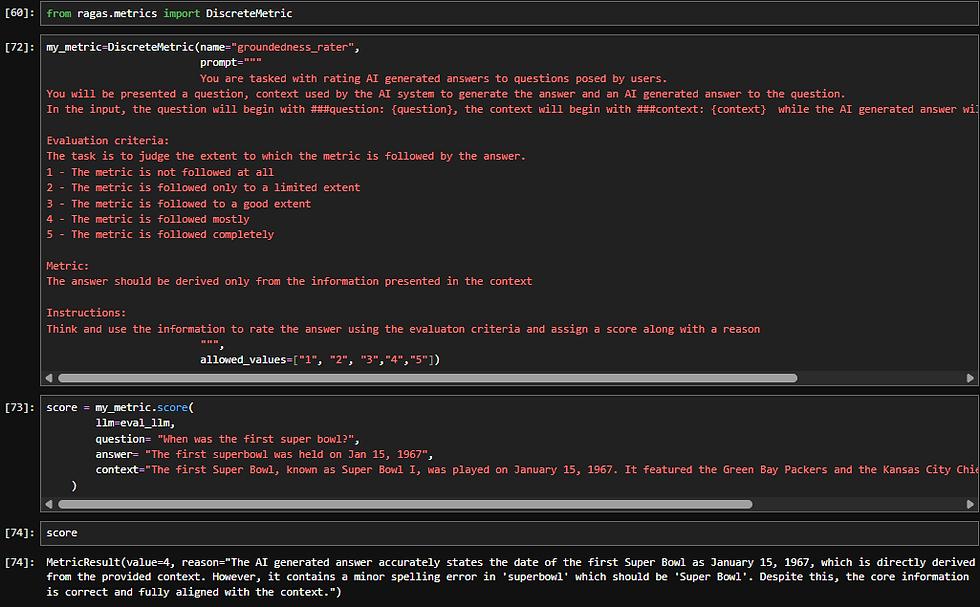
When creating a DiscreteMetric, you typically define:
What inputs the metric consumes, you are in-charge of setting the prompt context here:
Question
Generated answer
Retrieved contexts
(Optionally) reference answers
The evaluation prompt or instruction
Clear criteria for how the judgment should be made using the input metrics defined above.
Explicit definitions of allowed outputs < I leveraged this to add a reasoning as well as part of the output which we will see in the code snippet below>
The discrete output space
Fixed labels (e.g., PASS/ FAIL , Supported/Unsupported, Correct/Incorrect )
Or a small, well‑defined set of categories
In the below code I aimed at Strict Grounding Score
A discrete list of ratings to see to what extent the RAG workflow abide by my defined metric.
Step 3: Running Experiments Over a Dataset
Once datasets and metrics were ready, the next step was experimentation.
Using RAGAS experiments, I was able to:
Loop over every row in a dataset
Apply multiple metrics in one run
Collect structured scores per example
What are all components you need to get a ready to use experimenting workflow:
Load a dataset from your test case csv files < that you created , we will create with test data generation in later part of the blog >

2. A retriver and rag_agent callable for each of adopting to different datasets:

3. Write and run the experiment. When called over the dataset, RAGAS automatically iterates over each Sample row in a loop. You can save your experiments in the root_dir < in our case ./eval that is already defined during Dataset creation >. RAGAS automatically saves the experiment under
<your defined root_dir>/Experiments folder :


So you will have an eval folder having datasets and expriments folders in it:


Instead of eyeballing outputs, I now had experiments that have the scores to be compared.
Step 4: Generating Synthetic Test Sets with TestsetGenerator
Before we start, I would like to tell you something that I only learned by experimenting and did not find written anywhere.
RAGAS test generation utility performs significantly well over a well-defined node-based (or structured) document representation < for example an md file with a title and metadata info > for synthetic test set generation. RAGAS documentation uses md files to achieve the results. Do not lose hope if the same doesnt work in the exact way for your pdf documents.
Usual PDF documents might not have the node compatible structure, as langchain_PDF document loaders add metadata but most of the time they will have blank title and subject as most of the documents / pages do not contain these info unless present in the page explicitly.
So as a solution or more like a fallback, ensure to add headlines and summaries during Knowledge graph build, as you will see in my code snippet below.
RAGAS 0.4+ has evolved how it deals with the document chunks , it provides us a way to generate a knowledge graph ourselves that:
represents each chunk as a node
defines relationship between nodes
defines metadata for the nodes [ headlines, summaries, key phrases etc. ]
To give you an idea how it looks:

I am not diving deeper into query synthesizer, have used SingleHopSpecificQuerySenthesizer, which generates headlines/key-phrase related test queries < you can read more about it here: https://docs.ragas.io/en/stable/howtos/applications/singlehop_testset_gen/?h=query#configuring-personas-for-query-generation >

Once generated, these test sets can be converted to RAGAS dataset and be directly plugged into the evaluator.

Step 5: Stitching Everything Together in a Loop
The final step was automation.
My evaluation loop looked roughly like this:
Load or generate a dataset
Run the RAG pipeline to produce answers
Attach retrieved contexts and outputs
Run RAGAS metrics across all rows
Store results for comparison

With this setup, evaluating a new retriever, prompt, or model became a single function call.
This is where RAG evaluation stopped being a one‑off task and became part of the development workflow.
What to do Next
Compare multiple retrievers < using the same RAGAS dataset >
Continuous Integration (CI) evaluation integration
Custom metrics for domain‑specific grounding
Visual dashboards on top of RAGAS outputs
⚠️ Cost Awareness When Using RAGAS
RAGAS relies heavily on LLM‑as‑a‑judge, which means evaluation cost scales quickly—especially with large documents, long contexts, and frequent runs.
To keep costs under control:
Run RAGAS selectively, not continuously
Keep evaluation datasets small but high‑signal
Be mindful of context length and document size
Prefer CI‑style evaluation over ad‑hoc experimentation
Use judge models that are equal or stronger than your RAG agent model
RAGAS is best treated as a quality gate, not a runtime metric.


Comments